My Music Listening Setup #
Desktop PC #
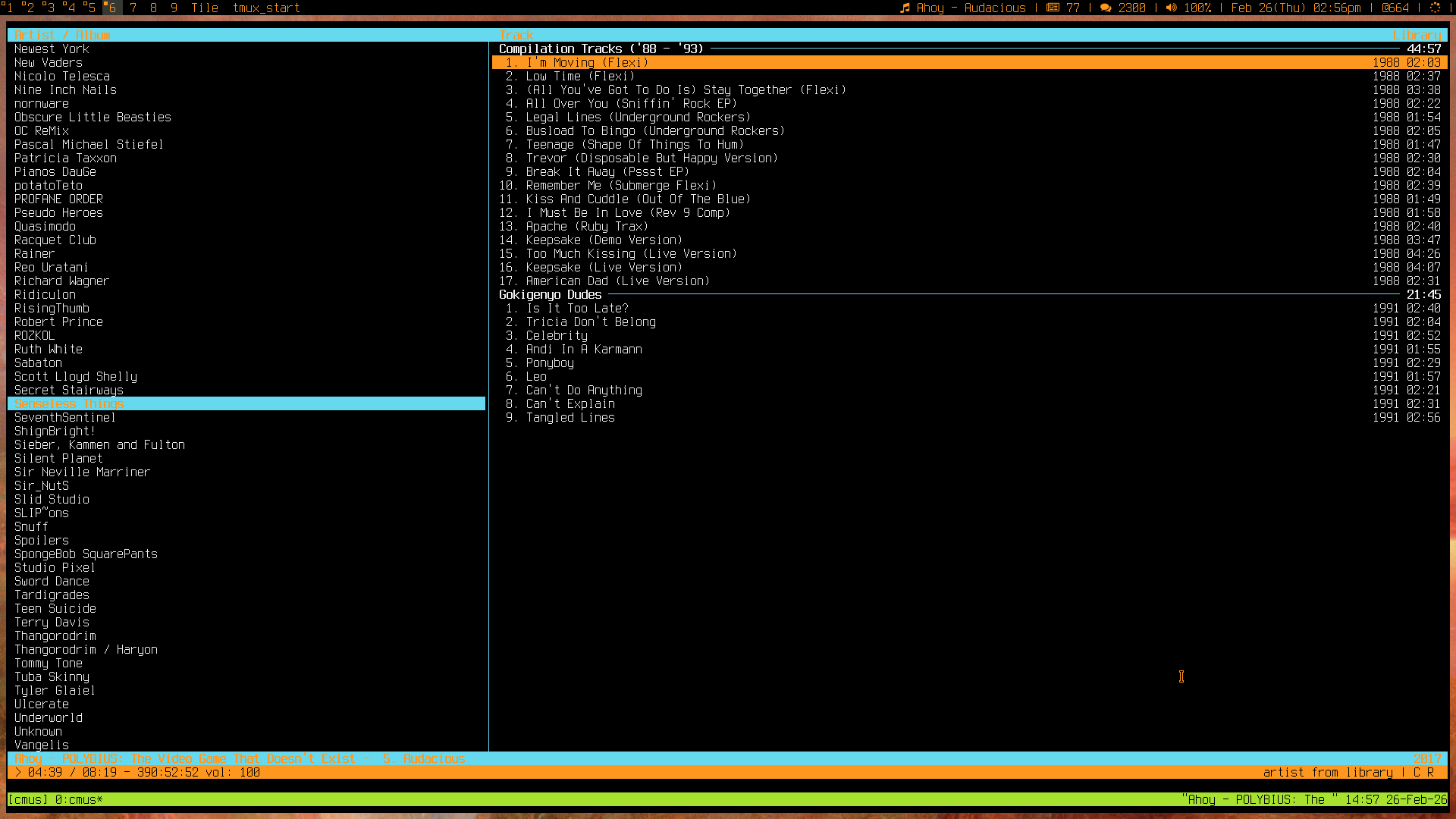
My music listening setup on my PC is using cmus, in combination with a few scripts so that it can talk to my window manager, allowing me some global keybinds for looping songs, forwarding to the next song, or going back to the previous song and pausing and playing music.
Mobile and Syncing library #
This music is then synchronised over to my phone using syncthing. With syncthing, I can then listen to my music using an app called foobar2000. I use foobar2000 in combination with a skin named darkx that allows me to easily set it up to loop one song.
Metadata #
As both of these music players rely on metadata for setting them up, I used to use stag, however I have recently written my own metadata tool named ctag that is a little more helpful and less... prone to crashing.
Assorted script tidbits for using cmus #
If you're a layman, this is probably where things stop being as interesting to you.
As cmus has to be kept open and alive in a terminal session somewhere, I use tmux for this purpose. Once it has been opened, cmus-remote can then talk to it, which is what I use to talk to cmus in these scripts.
st -e tmux_start cmusAnd the equivalent tmux_start script
#!/bin/sh
case "$1" in
	"cmus")
		tmux has-session -t cmus 2>gt;/dev/null
		if [ $? != 0 ]; then
			tmux new-session -d -s cmus \; \
				send-keys 'cmus --listen 0.0.0.0' C-m\;
		fi
		tmux attach-session -t cmus

	;;
# Other cases have been snipped
esac
A DWM Blocks status bar script for displaying currently playing music information:
#!/bin/sh
extraicon=""
if [[ "$(cmus-remote --server 0.0.0.0 -Q | grep "set repeat_current")" == "set repeat_current true" ]]; then
extraicon=" "
fi
icon=""
if [[ "$(cmus-remote --server 0.0.0.0 -Q | grep "status")" == "status playing" ]]; then
icon=" "
elif [[ "$(cmus-remote --server 0.0.0.0 -Q | grep "status")" == "status paused" ]]; then
icon=" "
fi
artist=""
artist=`cmus-remote --server 0.0.0.0 -Q |
grep --text '^tag artist' |
sed '/^tag artistsort/d' |
awk '{gsub("tag artist ", "");print}'`
title="";
title=`cmus-remote --server 0.0.0.0 -Q |
grep --text '^tag title' |
sed -e 's/tag title //' |
awk '{gsub("tag title ", "");print}'`
split=""
if [[ "$artist" != "" && "$title" != "" ]]; then
split=" - ";
fi
echo "$icon$extraicon$artist$split$title";
case $BLOCK_BUTTON in
1)pausemusic; pkill -RTMIN+11 dwmblocks;;
2)notify-send " Music module" "\- Shows music , if muted.
- Left Click to pause/unpause.
- Right Click to open music list.
- Scroll to change track.";;
3)$TERMINAL -e tmux_start cmus;;
4)cmus-remote --server 0.0.0.0 -n; pkill -RTMIN+11 dwmblocks;;
5)cmus-remote --server 0.0.0.0 -r; pkill -RTMIN+11 dwmblocks;;
esac;Some minor snippets from my dwm config.h file... #
For going backwards 10s.
cmus-remote --server 0.0.0.0 -k -10;For going forwards 10s
cmus-remote --server 0.0.0.0 -k +10;For going back a song
cmus-remote --server 0.0.0.0 -rFor going to the start of a song
cmus-remote --server 0.0.0.0 -k 0For going to the next song
cmus-remote --server 0.0.0.0 -nFor toggling whether it should be repeating the current song
cmus-remote --server 0.0.0.0 -C 'toggle repeat_current'Email your feedback about "My Music Listening Setup"
Published on 2026/02/26
Articles from blogs I follow around the net
HARD LIGHT (20 PAGES), PAGE 10
HARD LIGHT (20 PAGES) PAGE 10. WHERE WERE WE? OH YEAH, ALL MY BOOKS. TO BE HONEST, I DON'T THINK ANYONE REALLY CARES ABOUT WHAT I'VE READ OR HOW IT MIGHT HAVE INFLUENCED MY COMIC BOOK SCRIPTS. TELL YOU WHAT, IF ENOUGH READERS COMPLAIN WE'LL COM…
via I'm not really Stanley Lieber. October 25, 2026Warcraft III Reforged: Forsaken Kingdom > a half-assed review
Before there was a world– there was war – and for the first time in 20 years, return to the battlefields that defined a genre with an all-new update to Warcraft® III: Reforged. Warcraft III Reforged: Forsaken Kingdom premieres a brand-new playable campaign…
via andrei.xyz October 22, 2026thecozycat ❄️ On a bit of a hiatus. I am doing a bit of webring ...
On a bit of a hiatus. I am doing a bit of webring maintenance today but aside from that I won't be too active for a bit.
via thecozycat October 19, 2026Generated by openring